12306 Guide: How a Foreigner Books China Train Tickets
China's official railway app takes foreign passports directly: register, verify, pay through Alipay or WeChat, and board on an e-ticket with the same passport. The English walkthrough, the real refund and change fees, the verified download routes for iOS, Android and Harmony, and where 12306 still fights back.
Last updated: July 2026 · By the PandaRoads team in China
TL;DR
A foreigner books China trains on 12306 itself: register with a passport (the only document accepted right now), clear verification, search by station, pay through Alipay or WeChat Pay funded by a foreign card (single-transaction caps near ¥3,000 on Alipay and ¥6,000 on WeChat Pay), and board an e-ticket by showing that same passport at a gate or staffed lane, with no paper ticket to collect.
Abstract
An English, primary-source walkthrough of how a foreigner uses China's official 12306 app and website to book a train ticket: passport registration and verification, search and booking, payment reality with the Alipay and WeChat caps, e-ticket boarding, changes and refunds, plus the verified official download routes for iOS, Android and Harmony.
Key Takeaways
- 12306 is the only official ticket channel; resellers only resell it for a fee
- Registration now accepts a foreign passport; no Chinese ID needed
- Most foreigners pay by Alipay or WeChat Pay topped up with a foreign card
- An e-ticket means no paper pickup; the passport is your boarding credential
- The standard presale window is 15 days, including the travel date
- Refunds are free over 8 days out, then 5%, 10% and 20% closer in
- Official iOS app id is 564818797; domestic Android package is com.MobileTicket
By the Numbers
- 15 days standard presale window, counting the day of travel (source: 12306.cn)
- ¥3,000 Alipay cap on one foreign-card transaction (source: china-briefing.com)
- ¥6,000 WeChat Pay cap per transaction, ¥50,000 monthly (source: china-briefing.com)
- 0-20% refund fee, scaling with how close to departure you cancel
- 2.9 official app's iPhone rating out of 5 on the China store (source: itunes.apple.com)
- 30 minutes accidental-purchase grace window from 2 February 2026
Table of Contents
- Abstract
- Key Takeaways
- By the Numbers
- What 12306 is and why it is the only official way to buy a China train ticket
- Before you start: what a foreigner needs to book on 12306
- Where to download the official 12306 app: verified routes for iPhone, Android and Harmony
- Creating an account and clearing passport verification
- How to search and book a ticket, step by step
- How payment really works for a foreigner
- E-tickets and boarding: there is usually no paper ticket to collect
- When tickets go on sale: the 15-day window and the release clock
- Changing a booked ticket: what an endorsement (改签) actually costs
- Refunds, fee tiers and the new accidental-purchase window
- What 12306 is genuinely bad at, and when another route fits better
- Frequently Asked Questions
- Conclusion
- References
What 12306 is and why it is the only official way to buy a China train ticket
12306 is the app and website that China Railway runs to sell train tickets, and it is the only channel the railway itself authorizes for online sales (source: 12306.cn). The name reads like a version number or a code, but it is really the customer-service short line, 12306, that the platform is named after.
Everything else, a reseller in an app store or a desk clerk at your hotel, ends up buying the same seat through the official system. China Railway states on its official download page that it has never authorized any third party to sell tickets, and that it will not handle ticketing problems that start on another website (source: 12306.cn). That is the case for booking direct: the ticket costs what the train costs, with no per-ticket markup, and it is the only place a change or refund behaves the way the published rules say it should.
Two things are true at once, and holding both saves frustration. First, the platform does serve foreigners, and a passport is enough to register and to ride. Second, the product was built for a Chinese user, so parts of it assume you can read Chinese and that you hold a mainland bank card. The English site at www.12306.cn/en softens the first assumption, not always the second (source: 12306.cn). This guide is about working with both facts: opening an account, verifying a passport, picking a train, paying with what a foreign traveler usually has, and walking onto the train without hunting for a paper ticket that does not exist. For the wider picture of getting around once you arrive, see our first-timer China travel tips.
The short version, if you remember nothing else: register with a passport, search by station, pay through Alipay or WeChat Pay, and board with the same passport you booked with.
Before you start: what a foreigner needs to book on 12306
Before the first tap, gather four things. Having them ready is the difference between a two minute booking and an afternoon stuck on a verification screen.
- The passport you will physically travel with. Registration on the English site currently accepts only a foreign passport, so this is not a document you can swap out later (source: 12306.cn).
- A smartphone with the app installed, or a browser pointed at the English website. How to get the right app on iPhone, Android or Huawei is covered in the next section.
- A payment method that actually works for you. In practice that means Alipay or WeChat Pay funded by a foreign card; the install order and the wallet setup are covered in our guide to downloading and installing China's apps, so we will not repeat them here.
- The email address (and, if you can get one, a mainland mobile number) you will register against, because the platform sends account notices there.
The one rule worth internalizing before you type anything is real-name ticketing. China Railway ties each ticket to one identity document, and for a foreign passenger that document is the passport (source: 12306.cn). The practical consequence is that a typo in your passport number or your name is not cosmetic, it is a boarding problem, because the passport is what the gate or the staff check against the record you created.
A fair warning up front, because it is the thing that actually stops people: the account and passport verification step is where most foreigners lose time. It is usually solvable, and the steps are below, but budget for it on a quiet evening rather than the night before a train.
Booking as a foreigner needs exactly 4 things ready: the passport you will physically travel with, which is the only document the English site accepts for registration right now; the app or the English website; a payment path such as Alipay or WeChat Pay; and a working email for account notices. Having all four ready turns a multi-hour verification stall into a 2 minute booking.
Where to download the official 12306 app: verified routes for iPhone, Android and Harmony
Getting the real app matters more than it sounds, because app stores are full of look-alikes with "12306" in the name that are third-party resellers. Here is exactly what to look for on each platform, verified this session against the source on the right.
| Platform | Official app | Exact identity to confirm | Notes |
|---|---|---|---|
| iPhone / iPad | 铁路12306 | App Store id 564818797, bundle cn.12306.rails12306, seller "ACADEMY OF RAILWAY SCIENCES CO., ltd." | Free, about 174 MB, version 5.9.6 (source: itunes.apple.com) |
| Android, mainland store | 铁路12306 | package com.MobileTicket on Tencent MyApp (应用宝) | Operator 中铁程科技有限责任公司 (source: sj.qq.com) |
| Android, Google Play | Railway 12306 (international) | package com.chinarailway.globalticketing | English-facing build; confirm on device (source: play.google.com) |
| Huawei, HarmonyOS NEXT | 铁路12306 native build | Huawei AppGallery | Documented running on HarmonyOS 5 (source: consumer.huawei.com) |
| No install | English website | www.12306.cn/en | Full booking, changes and refunds (source: 12306.cn) |
The iOS identity is the one to trust most, because it is machine-readable: a lookup against Apple's iTunes Search and Lookup API returns track id 564818797, bundle id cn.12306.rails12306, and seller name ACADEMY OF RAILWAY SCIENCES CO., ltd., which is the China Railway research institute that operates the platform (source: itunes.apple.com). If a listing claims to be the official app but the seller is some other company, it is a reseller.
For mainland Android, the domestic 铁路12306 app is not distributed through Google Play; it is the com.MobileTicket package you reach through a Chinese store or by scanning the QR code on the official download page (source: sj.qq.com). China Railway separately publishes an international "Railway 12306" build under com.chinarailway.globalticketing that adds services like onboard meals and station transfers, but note that we could not directly load its Play listing from our environment, so treat that one as confirm-on-device rather than verified.
On recent Huawei phones running HarmonyOS NEXT, China Railway shipped a native build that Huawei support lists as working on HarmonyOS 5, installed from AppGallery (source: consumer.huawei.com). Whatever device you use, the safest single reference is the official download page at kyfw.12306.cn/otn/appDownload/init, which carries the iPhone and Android QR codes and repeats that no other app is authorized (source: 12306.cn). For the full install order across Chinese app stores and the wallet setup, see our China apps guide.
Creating an account and clearing passport verification
This is the step people fear, so here is what the form actually asks and what "verified" really means.
On the English site, registration is passport-only right now. The page states directly that at present only foreign passports are accepted for registration (source: 12306.cn). The fields it collects are nationality, name, passport number, passport expiration date, date of birth, gender, a username of 6 to 30 characters that begins with a letter, a password, and an email address. Fill the name exactly as your passport's machine-readable line prints it, do not invent spaces or punctuation in the number, and use the passport you will carry on the train.
After you register, your identity record sits in one of a few states. The FAQ describes passengers as "verified" or "ready to be verified," and only accounts and added passengers in those states can buy tickets, including tickets for other people through the My Passengers list (source: 12306.cn). A record that is not yet verified cannot complete a purchase, which is why a fresh foreign account sometimes lets you search but not pay.
The mobile app is where the friction usually clears, because that is where facial identity verification lives. Completing facial verification in the app also unlocks something useful: the ability to change or refund online a ticket you originally bought at a station window (source: 12306.cn). If the app will not accept or verify your passport record, the practical fix is a staffed ticket window to correct the record, not opening a second or third account, which tends to make it worse.
Two honesty notes. Verification can take time, so do it before you need a specific train, and the English site can still surface Chinese-only system notices mid-flow, so keep a translation app ready for the screen in front of you rather than assuming the whole thing will be in English. If verification stalls anyway, our team can book the ticket for you as a task while you wait.
Registration on the English site currently accepts only a foreign passport, asking for nationality, name, passport number, expiry, date of birth, gender, a username of 6 to 30 characters and an email. The record must then reach a verified or ready to be verified state before it can pay, which is why a fresh foreign login often searches fine but cannot book.
How to search and book a ticket, step by step
Once the account is verified, booking is quick. Run the steps in this order and you avoid the traps.
- Enter the departure and arrival stations, not just the city. Big cities have several stations, and a fast train that looks convenient on a timetable may leave from one an hour from where you are. The station printed on the order is the one that matters on travel day (source: 12306.cn).
- Pick the travel date inside the open presale window. If your date is not selectable yet, it is not on sale; the next section covers how far ahead that is.
- Filter by time and seat class, then choose a train. High-speed services carry G, D or C prefixes, but the prefix alone does not tell you which station it serves, so recheck the station.
- Add the passenger with the exact passport details from your verified record.
- Choose a seat preference where the train offers one, remembering that a preference is a request, not a guarantee; the confirmed coach and seat appear only in the completed order.
- Pay on the confirmation screen. Before you do, check the five fields that cause the most regret: date, departure station, arrival station, passenger and passport number, and seat class.
Two rules sit underneath the flow. A single ID buys only one ticket for the same train on the same date, so you cannot double-book the same person on one service (source: 12306.cn). And where the app lets an adult add a child, the child travels against the accompanying adult's identity under the age rules, which is a booking detail rather than a seat-class question.
Timing matters more than people expect. The English website keeps information queries and refunds open 24 hours a day, but ticket sales and endorsement run from 05:00 to 01:00 the next day, and only 05:00 to 23:30 on Tuesday (source: 12306.cn). After that nightly close, a payment that has not gone through can be released back into the pool, so complete the payment promptly rather than parking it.
How payment really works for a foreigner
This is the question with the most contradictory answers online, so here is the honest version. The platform takes payment through a Chinese bank card and through Alipay and WeChat Pay (source: 12306.cn). Whether you can type a foreign Visa or Mastercard straight into the checkout depends on the storefront shown in your own order and changes over time; many travelers find direct international-card entry limited or unreliable, and instead pay by pulling up Alipay or WeChat Pay, which their foreign card is already linked to. If you have not linked a card into a wallet, that setup is covered in our apps guide, not here.
What you do need to plan around is the ceiling each wallet puts on a single foreign-card transaction, because it directly caps the fare you can pay in one go.
| Payment path | What you link to it | Per-transaction reality for a foreign card |
|---|---|---|
| Chinese bank card | A mainland-issued card | No wallet cap, but most travelers do not have one |
| Alipay | A foreign credit or debit card | About ¥3,000 per single transaction (source: china-briefing.com) |
| WeChat Pay | A foreign credit or debit card | About ¥6,000 per transaction, ¥50,000 monthly cumulative (source: china-briefing.com) |
Read the table as a booking constraint, not just a money fact. A single business-class seat or a long high-speed leg can run past the Alipay per-transaction figure once your card is linked, and buying several tickets in one order stacks fares against the same cap (source: china-briefing.com). The workarounds are ordinary: pay the trip as separate orders, use WeChat Pay for the higher single-ticket ceiling, or ask a companion to book their own seat. The practical read of those two figures is that for a single ordinary ticket the ceiling you actually run into is the wallet's, and it bites hardest when several fares stack inside one order or a premium seat is involved, which is why splitting an order is the standard fix.
The exact pay buttons you are offered in your own order are the authority on what you can use today; the numbers above are the wallet-side limits, and the platform's own checkout decides which of them it surfaces to you. If a fare clears a cap and you would rather not split it into separate orders, you can hire someone in China to place the booking for you.
E-tickets and boarding: there is usually no paper ticket to collect
The biggest misconception a first-time foreign rider carries in is the idea that you must exchange a booking for a paper ticket before the train. You generally do not. China Railway sells both e-tickets and paper tickets, but the default through the app and the English site is an e-ticket, which the FAQ describes as an electronic voucher for the journey (source: 12306.cn).
How you board an e-ticket is the part that surprises people: you show the ID document you bought it with. The rule is explicit that a passenger reserves the e-ticket information plus the valid ID used to purchase it, and shows that ID to check in, exit and get aboard (source: 12306.cn). For a foreign passenger that ID is the passport, which is exactly why the earlier steps about matching your details are not pedantry.
At the gate, the reality is uneven rather than broken. Many stations now have readers, but where an automatic gate will not accept a foreign passport, you use the staffed manual lane and a person checks the document. That is normal, and it does not mean your ticket is invalid; it means the machine was built around a mainland ID card. Give yourself extra minutes at a large station for the manual check and for security, which every passenger and bag goes through. Our first-timer China travel tips have more on getting through a big station calmly.
One clarification about the extra paperwork you may see offered. You can print or download an "itinerary sheet" from your order, and you can ask for a reimbursement receipt, but the FAQ is blunt that neither the itinerary sheet nor the receipt is a ticket and neither is used to pass the gate (source: 12306.cn). A phone screenshot of your order is genuinely useful for finding your coach and seat in a busy station, but treat it as a reference, not a credential. The passport in your hand is the credential.
When tickets go on sale: the 15-day window and the release clock
If your travel date simply will not come up, it is almost certainly not broken; it is outside the presale window. China Railway's standard sale period online, by app and by phone is 15 days, counting the day of travel, and the railway adjusts it by advance announcement when it changes (source: 12306.cn). Its own presale lookup page reflects this by showing the farthest date currently on sale.
The 15-day rule shapes the whole trip. A fixed festival date, say a holiday five weeks out, is not bookable yet no matter how early you open the app today; you set a reminder for the day the window reaches it. On busy corridors the window is also when the good departures go, so riders who care about a specific morning train book the moment their date opens.
A nuance worth a sentence, so you are not caught out by a headline: on some flagship Beijing-Shanghai services the railway has piloted a separate advance reservation channel that opens earlier than the normal window, which is an exception announced line by line rather than the default (source: 12306.cn). Plan against the ordinary 15-day window and treat anything earlier as a bonus.
A sold-out screen on the day your date opens is common on peak routes and does not mean the train stays full; waitlist options and cancellations move seats back. What it does mean is that for a must-have departure on a must-have date, the release clock, not the app, is the thing you are actually racing. If you are still shaping the rest of the trip around it, our first-timer China travel tips cover what comes after the station.
Changing a booked ticket: what an endorsement (改签) actually costs
Plans move, and the platform lets you change a booked ticket through what it calls endorsement, but the rules are narrower than a refund and easy to misread.
Endorsement is the procedure for changing your date of travel, the train number, or your seat or berth, and it can be done when there is capacity for the change (source: 12306.cn). The hard limit is geography: you change when and on which train you go, not where, because the departure and arrival stations cannot be changed except between stations inside the same city. A ticket can generally be endorsed once, and an endorsed ticket that changes to a station cannot then be re-endorsed.
The fee is where people expect a simple number and get a timing rule instead. Certain changes stay free, notably moving a ticket more than 48 hours before departure under conditions the site states, while pushing a ticket to a later departure can cost 5 percent, 15 percent or 40 percent of the lower fare depending how close to departure you are (source: 12306.cn). Because the amount depends on both the clock and the new train, the right habit is to read the fee the app shows on the confirmation screen rather than reciting a rule from memory.
One app-specific unlock ties back to verification: if you completed facial identity verification in the mobile app, you can endorse, online, even a ticket you first bought at a station window (source: 12306.cn). Without that, a window-bought or cash ticket sends you back to a staffed counter to make the change. When plans have shifted a lot, compare the shown change fee against refunding and rebooking, since a change is not always the cheaper door.
The railway calls a booking change an endorsement, and it can move the date, train number or seat but not the departure or arrival city, except between stations inside the same city, and only once per ticket. Pushing to a later train costs 5, 15 or 40 percent of the lower fare depending how close to departure you make the change.
Refunds, fee tiers and the new accidental-purchase window
Cancelling is straightforward, and the fee is a clean function of how far ahead of departure you do it. The official tiers, from China Railway's own English FAQ, are the table below, and the minimum fee is 2 yuan (source: 12306.cn).
| When you refund before departure | Refund fee on the ticket price |
|---|---|
| More than 8 days ahead | No fee |
| More than 48 hours and up to 8 days | 5% |
| 24 to 48 hours | 10% |
| Less than 24 hours | 20% |
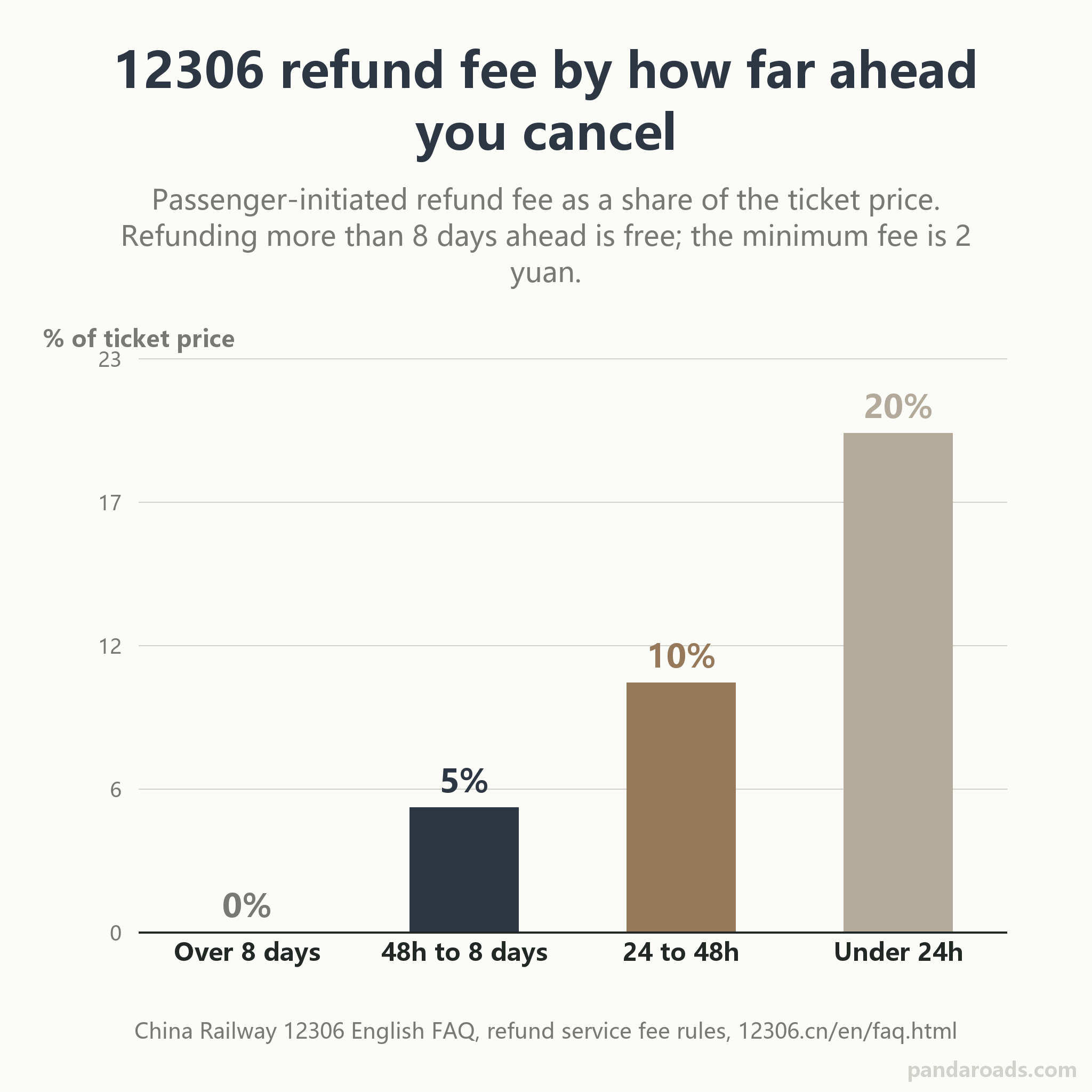
Read the flat part of the curve first: patience is free. Cancel eight or more days ahead and you pay nothing, so a tentative booking made the day the 15-day window opens is cheap to unwind (source: 12306.cn). The cost only begins once departure is inside a week, and it climbs steeply in the final day. Refunds return to the original online payment method, which is worth remembering when your money is riding through a wallet cap.
2026 added a small, specific safety valve. For travel from 2 February 2026, an eligible order placed on the website, the app or an Alipay mini-program can be refunded once per order per day with no fee if it is cancelled within 30 minutes of purchase and the train still leaves more than four hours later (source: 12306.cn). It excludes waitlist, group, rebooked, pre-ordered and cross-border tickets, so treat it as a mis-click correction window, not a general free-cancellation policy.
The honest framing: the 30-minute grace protects a genuine mistake; the 8-day free tier protects a plan that changes with lead time. Neither protects a change of mind on the eve of departure, and that is deliberate.
What 12306 is genuinely bad at, and when another route fits better
A guide that only lists steps is not trustworthy, so here is what is actually hard about using the app as a foreigner.
The app itself is rated modestly on the China App Store, around 2.9 out of 5 on the version we checked (source: itunes.apple.com), which tracks how the experience feels: it is a powerful tool built for a domestic user, and you are borrowing it. The English website helps, but a few system notices still appear only in Chinese, the passport-verification step can stall a fresh account, and payment through a foreign card is bounded by the wallet caps covered above (source: 12306.cn). Peak-date inventory is genuinely competitive, with popular departures gone the minute they open. None of this is fatal, but pretending it is smooth would be dishonest.
There is also a decision that is not about the railway app at all. Booking direct is the cheapest and the most flexible way to change or refund, because you are dealing with the source. If you would rather trade money for convenience, the one thing worth knowing is that a reseller is not selling you a different seat; it sells the same China Railway seat through a friendlier English interface and human support, for a per-ticket fee, under the same identity rules. Beyond that single comparison, we do not rank resellers here. If you decide a hand in the process is worth the fee, see how to hire someone in China.
So when does paying someone else make sense? If your Chinese is thin and the verification step has you stuck, if you want a seat hunted the second the window opens, or if you simply have better things to do than wrestle an app, handing it over is reasonable. That is exactly the errand our local team runs: we can book a train ticket for you as a fixed task, fold it into on-the-ground errands and help, or hire someone in China to run it end to end. For everything else, the walkthrough above is enough to do it yourself.
The official 铁路12306 iOS app sits near a 2.9 out of 5 rating on the China App Store across roughly 135,981 ratings, which sums up the tradeoff: a powerful domestic tool a foreigner is borrowing. Verification can stall a fresh account, some notices stay in Chinese, foreign card payment runs through the wallet caps, and peak departures sell out the moment they open.
Frequently Asked Questions
Can a foreigner register on 12306 with a passport? Yes. The English site's registration page states that at present only foreign passports are accepted for registration, and the form collects your nationality, name, passport number, expiry, birth date, gender, username and email (source: 12306.cn). Use the passport you will physically travel with, because the ticket is tied to it.
Is the 12306 app available in English? There is an official English website at 12306.cn/en with booking, change and refund functions, and China Railway publishes an international app, but the domestic 铁路12306 app (iOS id 564818797) is built around a Chinese interface and some notices stay in Chinese (source: itunes.apple.com). Keep a translation step ready for odd screens.
Do I need to collect a paper ticket for a China train? Usually no. The default is an e-ticket, and you board by presenting the ID you bought it with, which for a foreigner is the passport (source: 12306.cn). Neither a printed itinerary sheet nor a reimbursement receipt is a ticket.
How many days in advance can I book on 12306? The standard presale window is 15 days, counting the day of travel, with the railway announcing any adjustment in advance (source: 12306.cn). If your date is not selectable, it is not on sale yet, so set a reminder for when the window reaches it.
What payment methods does 12306 accept for foreigners? Through the app or site you pay by a Chinese bank card or via Alipay and WeChat Pay. Funding those wallets with a foreign card is the usual path, and the wallets cap a foreign card near ¥3,000 per transaction on Alipay and ¥6,000 on WeChat Pay, the latter with a ¥50,000 monthly ceiling (source: china-briefing.com).
Can I board a China train with just my passport? Yes, that is the point of an e-ticket: the passport is the boarding credential, scanned at a gate or checked at a staffed manual lane where the reader will not take a foreign passport (source: 12306.cn). A screenshot helps you find your seat but is not what you present.
How do I get a refund and what does it cost? Refund in the app or on the site, and the fee follows how far ahead you cancel: free more than 8 days out, 5 percent more than 48 hours, 10 percent for 24 to 48 hours, and 20 percent under 24 hours, with a ¥2 minimum (source: 12306.cn). Money goes back to the original payment method.
How do I download the official 12306 app? On iPhone, search the App Store and open the listing whose id is 564818797 and seller is ACADEMY OF RAILWAY SCIENCES CO., ltd. (source: itunes.apple.com). On mainland Android it is package com.MobileTicket (source: sj.qq.com), and the official QR codes live on the official download page (source: 12306.cn).
Conclusion
Booking a China train as a foreigner comes down to three things lining up: a passport that reaches a verified state, a payment path that clears the fare without tripping the wallet's per-transaction cap, and that same passport in your hand at the gate. Get those right and the flow is quick, register, search by station, pay, and walk on with no paper ticket to collect. Where it slows down, it slows for predictable reasons, a verification lag, a system notice that stayed in Chinese, or a good departure that sold out the minute the 15-day window opened. None of those need a reseller markup to solve, and the verified App Store id and Android package above keep you clear of the look-alike apps that share the name. Do it once, and the second trip takes minutes rather than an evening.
References
- China Railway Customer Service Center. (2026). Passenger guide: Ticketing, endorsement and refund (English FAQ). https://www.12306.cn/en/faq.html
- China Railway Customer Service Center. (2026). Create an account (English registration). https://www.12306.cn/en/register.html
- China Railway. (2026). 12306 mobile client download [铁路12306客户端下载]. https://kyfw.12306.cn/otn/appDownload/init
- China Academy of Railway Sciences Corporation Limited. (2026). 铁路12306 (Version 5.9.6) [Mobile application]. Apple App Store (China region). https://apps.apple.com/cn/app/id564818797
- China Railway. (2026). Railway 12306 [Android application]. Google Play. https://play.google.com/store/apps/details?id=com.chinarailway.globalticketing
- 中铁程科技有限责任公司 (China Railway Science and Technology Co.). (2026). 铁路12306 (Version 2026.7.15) [Android application]. Tencent MyApp. https://sj.qq.com/appdetail/com.MobileTicket
- Huawei Device Co., Ltd. (2026). 华为手机升级HarmonyOS 5及以上版本铁路12306实况窗相关问题汇总 [HarmonyOS 5 铁路12306 support note]. https://consumer.huawei.com/cn/support/content/zh-cn16056649/
- China Briefing. (2023). WeChat enables foreigners to pay with overseas cards in China. https://www.china-briefing.com/news/wechat-enables-foreigners-to-pay-with-overseas-cards-in-china/
Last reviewed and updated: September 2026. Author: our editorial team. For tailored guidance, contact our team.