How to Use Amap (Gaode Maps) in China as a Foreigner
Amap (Gaode Maps) is the map app China actually runs on, and a foreigner can drive it: verified download ids for iPhone, Android and Huawei, the honest state of its English mode, searching Chinese you cannot read, the multi-provider taxi button, offline maps, and why Google Maps is not the fallback here.
Last updated: July 2026 · By the PandaRoads team in China
TL;DR
Install Gaode Maps (iOS App Store trackId 461703208, Google Play package com.autonavi.minimap, plus an official HarmonyOS build), switch Settings to English knowing some labels stay Chinese, search by pasting Chinese names, read driving/transit/walk/cycle routes, book rides through its multi-provider taxi button and pay via Alipay or WeChat Pay with a linked foreign card, download offline maps first, and treat Google Maps as unavailable on the mainland.
Abstract
A practical, sourced, English-only guide to using Gaode Maps (高德地图) as a foreigner in mainland China: verified download routes for iPhone, Android and Huawei, the real state of its English UI, address search with Chinese you cannot read, multi-modal directions, the taxi aggregator and wallet payment, offline maps, and why Google Maps does not work here.
Key Takeaways
- Amap is Gaode Maps (高德地图), Alibaba's China-native map and the default here
- Verify the build: iOS id 461703208, Google Play com.autonavi.minimap, official HarmonyOS
- English is real but partial: menus and place labels often stay Chinese
- Paste the Chinese place name; searching English rarely matches
- The taxi button is an aggregator calling multiple providers at once
- Pay via Alipay or WeChat Pay: foreign cards are capped per transaction
- Google Maps is blocked and datum-offset (GCJ-02) on the mainland
Table of Contents
- Abstract
- Key Takeaways
- What Gaode Maps actually is, and why it wins in China
- Before you start: what you need to navigate China with Amap
- Step 1: Download the right Amap build (verified iOS, Android, Google Play, Huawei)
- Step 2: Switch Amap to English, and what "English" really means
- Step 3: Search an address when you do not read Chinese
- Step 4: Read directions for driving, transit, walking and cycling
- Step 5: Use Gaode's taxi button (it is an aggregator) and pay by wallet
- Step 6: Download offline maps before you depend on them
- What Amap cannot do, and the real Google Maps situation in China
- Troubleshooting: the moments Gaode stops making sense
- Frequently Asked Questions
- Conclusion
- References
What Gaode Maps actually is, and why it wins in China
Amap is the English shorthand for Gaode Maps (高德地图), a digital map, navigation and location-based-services platform owned by Alibaba Group (source: jetpacglobal.com). Locals say 高德 (Gaode); foreigners say Amap. They are the same product wearing a Chinese name and an English label, so a guide that treats them as two apps is only confusing you.
China is not a place where an imported map quietly works out of the box. Road layouts change fast, alleys and gated compounds defeat generic routing, and the country runs on its own map coordinate system. Gaode is built natively on Chinese map data, so it knows the overpass, the station exit and the correct side of a divided road, and it plans for driving, public transit, walking and biking with estimated arrival times (source: english.shanghai.gov.cn). It is also the engine underneath tools you may already trust: Apple Maps in mainland China draws on AutoNavi, the company behind it, so even the "clean iPhone map" is reading Gaode's data (source: gochinafreely.com). That is why so many foreigner guides say to open it first every morning.
For a foreigner, that dominance turns into something concrete. One app gives you live traffic, metro and bus directions, a taxi you can call without haggling, and a searchable map of a city you cannot read. The catch, which this guide keeps honest, is that "one app for everything" comes with partial English, menus that flip back to Chinese, and a search box that works best when you paste characters you do not yourself understand.
This article is a how-to for exactly one job: getting around mainland China inside Gaode when you read English and little or no Chinese. It covers installing the right build, switching the language, searching an address you cannot read, reading directions across travel modes, booking a ride through the taxi button, preparing offline maps, and the honest limits of the whole thing. Buying trains and long-distance tickets is a separate task and is deliberately left out. If you would rather not assemble the routing yourself, tell us your plan and we will build a navigation-proof itinerary on the custom quote page.
Amap is the English name for Gaode Maps, an Alibaba-owned navigation platform built natively on Chinese map data; it plans 4 route modes (driving, transit, walking and cycling), and Apple Maps in mainland China runs on the same AutoNavi engine, so foreigner guides open it first because it reflects real Chinese roads, exits and lanes (source: gochinafreely.com).
Before you start: what you need to navigate China with Amap
A handful of small preparations remove most of the friction later, and none of them takes long if you do them at home rather than on arrival with a dying battery and no signal.
Here is what to have ready:
- Gaode installed and opened once, so permission and login prompts do not ambush you at the airport. The next section covers which build to install.
- Your key destinations saved as Chinese text you can paste: the hotel's Chinese name and address from your booking, plus one official attraction page for each must-see. Copy-paste of exact Chinese text is the single most reliable search habit (source: gochinafreely.com).
- A payment app, Alipay or WeChat Pay, already linked to your foreign card, but only if you plan to tap the taxi button. The wallet onboarding, the order to install apps, and any VPN or connectivity planning all live in our China apps download and install guide. This article assumes you followed it and stays on maps.
- A second map app as a cross-check, Baidu Maps or, on an iPhone, Apple Maps, because a search that looks wrong in one app is often right in another.
- Offline maps for your cities, which is its own step further down.
One reassuring fact before the work. Gaode is a Chinese app running on Chinese data, so it works normally without a VPN, which is more than you can say for Google Maps here (source: chinasurvivalkit.com). What you cannot assume is that every screen greets you in English. Some do, many do not, and that gap is the point of the next several steps.
Correct one assumption now: installing the app is not the same as being able to pay inside it. Gaode can find your destination and call a car, but the money moves through Alipay or WeChat Pay, and some account features, including saved favorites and ride-hailing, may ask for a mobile-number login even though plain map browsing does not (source: gochinafreely.com). Read the payment part before you stand at a kerb counting on a ride.
Before you fly, complete 5 quick preparations: install and open the app once, save your key destinations as pasted Chinese text, link Alipay or WeChat Pay if you plan to hail rides, keep a second map app for cross-checks, and download offline maps; the app itself runs without a VPN because it is a domestic app on domestic data (source: chinasurvivalkit.com).
Step 1: Download the right Amap build (verified iOS, Android, Google Play, Huawei)
You asked for the actual download routes, so here they are, each one checked this session against a primary source rather than copied from a blog. The table is the article's claim to trust: it names the exact store identity for every channel.
| Store or channel | Exact identity | Name you will see | Source |
|---|---|---|---|
| Apple App Store | trackId 461703208, bundleId com.autonavi.amap, seller AutoNavi Information Technology Co. Ltd., free, store languages EN + ZH | 高德地图 in the China storefront, "AMap Global" in the US, UK and Singapore storefronts | itunes.apple.com |
| Google Play | package com.autonavi.minimap | "AMap Global" | play.google.com |
| Android official | Android build from Amap's own site, next to a Google Play link and domestic stores | 高德地图 | amap.com |
| Huawei / HarmonyOS | HarmonyOS (鸿蒙) build listed on Amap's official site | 高德地图 | amap.com |
Read the iOS row first, because it clears up the confusion that trips most guides. There is a single App Store listing behind both names: id 461703208, bundleId com.autonavi.amap, published by AutoNavi, free, with English and Chinese store languages, at version 17.0.1 when this was checked (source: itunes.apple.com). In the China storefront its title carries the domestic 高德地图 name; in Western storefronts the very same id is titled "AMap Global" (source: itunes.apple.com). So "Amap", "Gaode Maps" and "AMap Global" on iOS are one product wearing its storefront's name, not three different apps.
On Android, the international listing is package com.autonavi.minimap under the "AMap Global" name, and its store text says Gaode Maps services now reach over 230 countries and regions (source: play.google.com). Huawei matters more than guides admit: a growing number of phones ship without Google Play, and the developer's own site offers a HarmonyOS (鸿蒙) build while also linking the Google Play and standard Android channels, so a Huawei owner is not stranded (source: amap.com).
Two honest limits on what this session could confirm. First, the "over 230 countries" figure is the Google Play listing's own wording captured through search results; the Play page would not load directly from here, so treat it as the store's claim, not an independently audited count. Second, several guides describe a separate app called "Amap Go", but an iTunes lookup surfaced no distinct listing under that name, only id 461703208, so this article does not assert that a separate "Amap Go" exists (source: itunes.apple.com). When a download route cannot be verified, the right move is to say so rather than guess.
In practice: search "Amap" on iOS, search "AMap Global" or 高德地图 on Android or HarmonyOS, verify the publisher is AutoNavi, and install before you fly. For the full setup sequence and the rest of your China app stack, follow the apps guide.
Verified this session: the iOS listing is trackId 461703208 with bundleId com.autonavi.amap, published by AutoNavi, free, at version 17.0.1, and the Google Play package is com.autonavi.minimap, so search Gaode on iOS or AMap Global on Android, then confirm the publisher reads AutoNavi (source: itunes.apple.com).
Step 2: Switch Amap to English, and what "English" really means
Does Amap have an English version? Yes, with an asterisk you should understand before you expect a fully translated app.
Start with the good news. The Shanghai municipal government's English portal describes Gaode Maps, also known as AMap Global, as having launched China's first English map for overseas users, available on Android and iOS, offering driving, public-transit, walking and biking routes with estimated arrival times (source: english.shanghai.gov.cn). The App Store listing for id 461703208 itself carries English among its store languages (source: itunes.apple.com). So the English interface is real and officially recognized, not a hack.
The switch path drifts slightly by version, but the route foreigner guides describe is: open the Me or profile tab, go to Settings (设置), then the general or language option (语言), and choose English; the interface refreshes to English (source: chinasurvivalkit.com). If you cannot find it, do not panic and do not assume you are stuck, because the core search and route screens work regardless.
Now the asterisk. In daily use, "English mode" means more English labels, not every label. Travelers consistently report that some menus, many place names and most turn-by-turn transit steps stay in Chinese characters, and that the app can flip back to Chinese after an update or a region change (source: chinasurvivalkit.com). A China navigation guide puts it plainly: recent builds include more English-oriented support for overseas users, but mixed language is normal, so airports and chain hotels may appear in English while small restaurants, reviews and deals stay Chinese (source: gochinafreely.com). Expect a bilingual reality: English where the app chose to translate, Chinese where it did not. That is exactly why the next step, searching with pasted Chinese text, matters more than the language switch itself.
One honesty note about numbers. Guides often state that Gaode launched English in a particular month and supports a round number of languages. This session could not confirm any exact month or language count from the app's own materials, and the government source already described an English map in late 2024, so the precise date and the language total are deliberately left unasserted here (source: english.shanghai.gov.cn). What you can rely on is simpler and enough: Gaode has a genuine English interface, and it is partial.
Amap has a real English interface, described on Shanghai's government portal in late 2024 as China's first English map for overseas visitors, and the iOS listing carries English among its store languages; the honest caveat is that translation is partial, so expect a bilingual app rather than a fully English one (source: english.shanghai.gov.cn).
Step 3: Search an address when you do not read Chinese
This is the skill that decides whether Gaode helps you or frustrates you. Typing an English name that no local ever uses is the most common failure, because the app's points of interest are cataloged under the Chinese names people actually give them. The fix is to feed Gaode the characters it already has.
Work through the methods in this order.
- Paste the Chinese name. Copy the destination's Chinese name from a booking confirmation, an official attraction page, or a WeChat shared location, and paste it into the search bar. For a Beijing example, paste 中国国家博物馆 rather than "National Museum of China" (source: gochinafreely.com).
- Paste the Chinese address. Chinese addresses run big to small, city, then district, then road, then number, so paste the whole line if your hotel gave it to you.
- Search the phone number. A venue's phone number often resolves to exactly the right place when its name returns a dozen near-duplicates.
- Try toneless roman letters. For famous landmarks, typing plain letters such as tiananmen often surfaces the right result; pick the one whose distance and district match (source: gochinafreely.com).
- Route from an anchor. Search the nearest metro station or a large landmark, then walk the last stretch.
- Drop a pin. When text search fails, zoom in and long-press the roof, gate or entrance you mean, set that pin as your destination, then confirm the final entrance against street signs (source: gochinafreely.com).
When you cannot type any Chinese at all, these five keywords cover most emergencies. Copy them somewhere now.
| What you need | Paste this |
|---|---|
| Metro station | 地铁站 |
| Hospital | 医院 |
| Pharmacy | 药店 |
| ATM | 取款机 |
| Parking | 停车场 |
Before you tap navigate, confirm you chose the right result. Check the district, compare the photos, and sanity-check the distance. Chains and apartment hotels reuse near-identical names, so matching one hard detail, the Chinese name, the street number or the phone number, is what stops you navigating to the wrong branch (source: chinasurvivalkit.com).
When a place will not surface from its English name, the app rewards 6 fallbacks used in order: paste the Chinese name, paste the full Chinese address, search the venue's phone number, try toneless letters for a landmark, route from the nearest metro station, or long-press to drop a pin on the exact entrance (source: gochinafreely.com).
Step 4: Read directions for driving, transit, walking and cycling
Once you have a destination, tap Route (路线) and pick a mode. The app plans several options at once and shows an estimated time for each, so the skill is choosing the route you can actually follow, not automatically the fastest one on the list.
Driving. The official feature list puts real-time traffic at the core: congestion status, multiple route options, and guidance across what the app describes as more than 1.8 million electronic-eye and speed-camera points (source: amap.com). The Shanghai government guide uses the same color logic you will see on screen: green means smooth traffic and red means heavy congestion, so read the color before you commit to a lane (source: english.shanghai.gov.cn).
Public transit. This is where Gaode either saves your day or overwhelms you. Its transit view names the line, the boarding station, the transfer, the alighting station and the walk between them, and the official site adds real-time bus arrivals, shared-bike finding and a mixed cycling-plus-transit plan the site labels 混合规划 (source: amap.com). Two habits make it survivable for a non-reader. Screenshot the whole route, including the station exit letter or number, before you go underground where signal drops; and if you are carrying luggage or tired, deliberately pick the option with fewer transfers instead of the shortest minutes (source: chinasurvivalkit.com). Open the recommended line and watch the first and last train times, because service is not 24 hours (source: gochinafreely.com).
Walking and cycling. Both give step-by-step guidance along the blue line, and the bike mode is aware of bike lanes and shared-bike entries (source: amap.com). Keep your screen brightness up in sun glare and re-center if the position dot drifts in tall-building streets.
A firm scope note. Everything in this section is about reading routes inside the app. Buying an actual train or long-distance ticket is a separate process owned by another guide, and nothing here covers ticket purchase. Gaode's in-app transit metadata is navigation; the checkout counter is not.
Step 5: Use Gaode's taxi button (it is an aggregator) and pay by wallet
The most important thing to understand about the 打车 (taxi) button is what it is not. It is not a single fleet of app-branded cars. It is an aggregator. The developer's own site describes 高德打车 as letting you select multiple vehicle types and dispatch one order to several providers at the same time to get picked up faster, phrased there as 车辆多选,同时发单,更快接驾, with a separate 顺风车 carpool product beside it (source: amap.com). Independent guides see the same thing: the car-hailing panel surfaces partner operators and different provider options in one place (source: gochinafreely.com). That is why a car usually comes quickly, and why the fare you see is one quote among several.
Booking itself is simple. Enter your location and destination and the app arranges a ride to your stop, showing nearby availability and an estimate (source: english.shanghai.gov.cn). What actually goes wrong is the meeting point, not the order. At airports, malls and stations, cars may only stop in legal bays, which produces the classic loop where the driver says they have arrived, you cannot see the car, nobody can find each other, and a cancellation fee looms. The fix is unglamorous and it works: zoom in, find the nearest spot where cars can legally stop, walk there for two to five minutes, and only then request the ride (source: chinasurvivalkit.com).
How you pay. The fare normally settles through Alipay or WeChat Pay rather than a card stored in the app itself, so guides tell you to finish your wallet setup before you rely on in-app car payment (source: gochinafreely.com). Both wallets accept a linked international Visa or Mastercard, and two limits matter. They are the same figures used across our China payment coverage: on a foreign card, Alipay allows roughly RMB 3,000 per single transaction, while WeChat Pay allows about RMB 6,000 per transaction with an RMB 50,000 monthly cumulative cap (source: china-briefing.com). If your ride fare sits under those ceilings, which an ordinary city trip will, the money moves without a problem.
A login caveat worth flagging. Plain map browsing usually needs no account, but saved favorites, synced history and the ride-hailing flow itself may prompt for a mobile-number login, so set that up deliberately rather than at the kerb (source: gochinafreely.com). For the wallet and account setup that make payment work, follow the apps guide. One disambiguation only: DiDi is a separate ride-hailing app with its own full workflow, which belongs to the apps guide, not to this navigation piece.
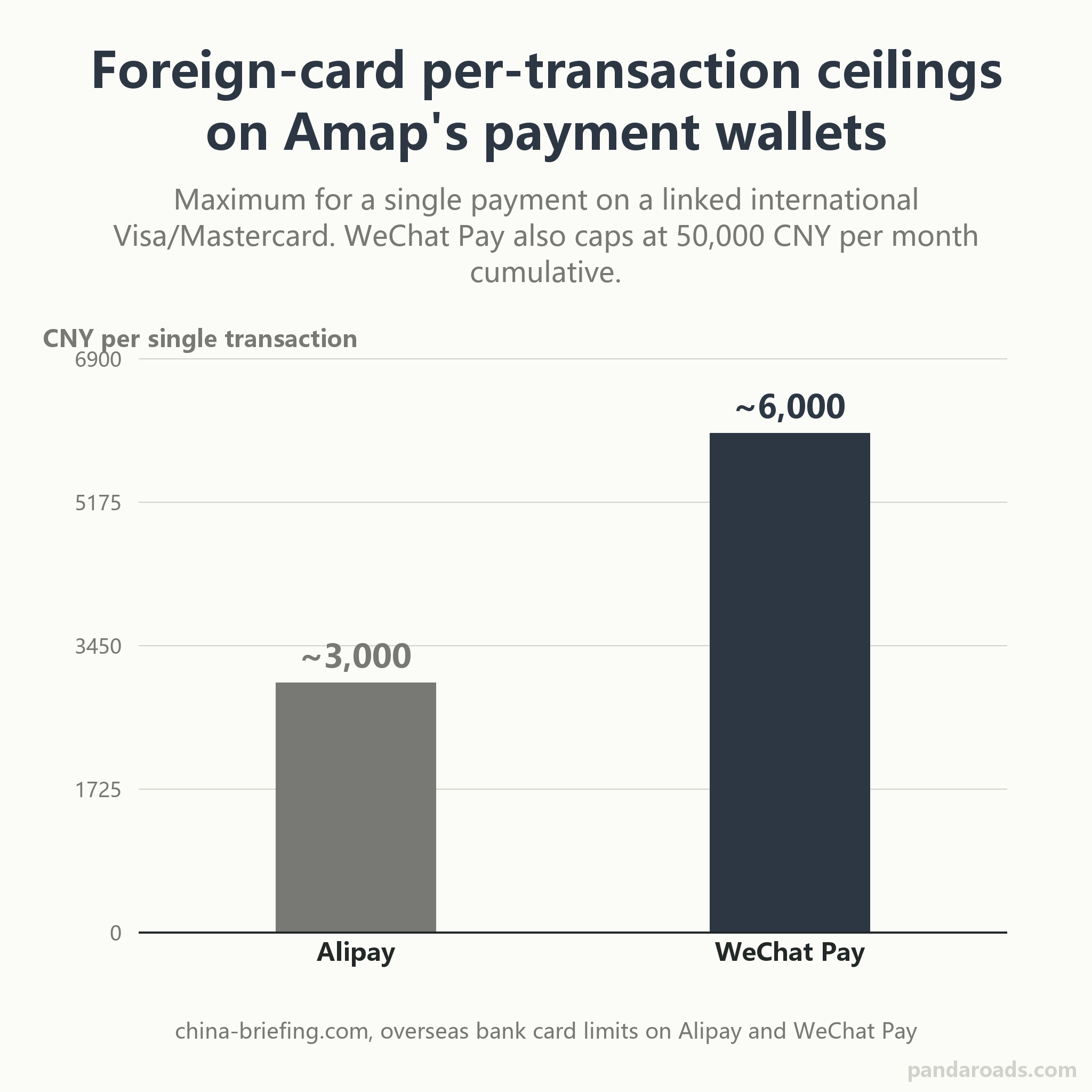
The 打车 button is an aggregator, not one fleet: 高德打车 dispatches a single order to several providers at once, and the fare settles through a linked wallet, where a foreign card is capped near RMB 3,000 per transaction on Alipay and RMB 6,000 per transaction on WeChat Pay (source: china-briefing.com).
Step 6: Download offline maps before you depend on them
China has superb coverage, but every traveler still hits a dead zone: a deep metro platform, an underground mall, an elevator, a rural stretch between towns. Offline maps are your insurance, and, like all insurance, they are only useful if you bought them before the accident. Set them up while you still have signal.
In Gaode, look for the offline-maps entry under the Me area and download the city you are about to use; the option is often labeled only in Chinese, something along the lines of 离线地图, and its presence and depth vary by version and build (source: chinasurvivalkit.com). Then do the thing that matters more than the offline data itself: save your lifeline places as favorites on day one. Tap the star (收藏) on a place card to keep your hotel, the nearest metro station, a big mall you can anchor to, and a hospital one tap away, so that returning to them needs no typing and no searching exactly when you are least able to do either (source: gochinafreely.com).
Be honest about what offline does not cover. An offline map keeps the base tiles and your saved pins usable when the network drops, but live traffic, ride-to-car-hailing estimates, real-time bus arrivals and fresh search results still need a connection. Guides warn that in tunnels, underground stations and dense indoor areas you should lean on screenshots, station signs and exit numbers rather than live GPS, precisely because the position dot and transit detail go unreliable (source: gochinafreely.com). If a city matters to you, download it once at home and once the night before you go, keep a second app installed as a backup, and screenshot your hotel's Chinese address as a paper trail no dead zone can take away. For the VPN and connectivity setup that keeps live features working away from wifi, see our apps and connectivity setup guide.
Offline maps are insurance you buy before the accident: download each city 2 times, once at home and once the night before, and save your hotel, nearest metro and a hospital as favorites on day 1, because offline keeps base tiles and saved pins while live traffic, ride estimates and real-time buses still need a connection (source: gochinafreely.com).
What Amap cannot do, and the real Google Maps situation in China
Gaode is powerful, not magic, and naming its limits is part of choosing it well. Many menus, place labels and turn-by-turn transit steps stay in Chinese even in English mode, so the copy-paste methods earlier are core technique, not a shortcut. Small restaurants, reviews and deals often carry Chinese-only text (source: gochinafreely.com). And Gaode is a China-first product: outside the mainland its depth thins, which is why its own store copy frames the international edition around broad country coverage rather than the full local-services stack you get inside China (source: play.google.com).
The Google Maps question deserves a straight answer, because it is the reason you searched for this page. Google Maps is blocked across mainland China: open it there and it may load partially but will not give updated data, live routes, turn-by-turn directions or traffic, and your position can sit hundreds of meters from where you actually are (source: jetpacglobal.com). Two independent causes stack up. The first is access. Google pulled most of its mainland services in 2010 and its servers are blocked, so you need a VPN even to try, and VPNs are regulated and unreliable (source: jetpacglobal.com). The second is technical and does not go away with a VPN. China maps to the GCJ-02 coordinate system while Google uses the global WGS-84 datum, and because Google is not licensed for the Chinese datum, the offset remains (source: jetpacglobal.com). Google Maps does keep working normally in Hong Kong, Macau and Taiwan.
Here is the whole map-app picture in one place.
| App | Works on the mainland? | English | Strength | Weakness |
|---|---|---|---|---|
| Amap (Gaode) | Yes | Partial | Native data, ride-hailing, transit, offline | Many labels stay Chinese |
| Google Maps | Blocked and unreliable | Full | Excellent outside China | Firewalled, GCJ-02 offset, no live routing |
| Apple Maps | Yes | Full | No VPN needed, clean on iPhone | Runs on Amap data, so not an independent check |
| Baidu Maps | Yes | Weak | The other deep local map | Chinese-first interface |
One nuance about that table. Apple Maps feels like a separate choice, but in the mainland it uses Gaode's mapping services, so it is a cleaner screen, not a second data source to double-check against (source: gochinafreely.com). Baidu Maps earns only a one-line mention here on purpose: it is a genuine alternative if Gaode cannot find a place, and it has its own dedicated guide elsewhere. For the wider picture of staying oriented and connected on a first trip, see our first-timer travel guide.
Google Maps does not work reliably on the mainland for two stacked reasons: Google pulled most services in 2010 and its servers are blocked, and China maps use the GCJ-02 datum rather than Google's WGS-84, so even a VPN leaves a position offset; Gaode avoids both problems because it is built on domestic data (source: jetpacglobal.com).
Troubleshooting: the moments Gaode stops making sense
People search for help when a map fails them, so here are the failures that catch foreigners most often, each with the cause and the fix.
- The interface flipped back to Chinese. Usually a version update or a region change reset the language. Re-check Settings to Language and choose English, restart the app, and if it still resists, restart the phone, which clears more of these than you would expect (source: chinasurvivalkit.com).
- Search results are wrong or missing. Switch inputs in this order: paste the Chinese name, then search the venue's phone number, then search the nearest metro station, then long-press to drop a pin on the block you mean (source: gochinafreely.com).
- It says I am 200 meters away but the building is not here. Dense Chinese cities have multiple gates, internal lanes and walled compounds, so the pin can be right while the entrance is not. Switch to walking for the last block, check the venue photos, and confirm which side of the main road you are on (source: chinasurvivalkit.com).
- The position dot is drifting. GPS wanders between tall buildings. Walk to an open intersection to re-center, then anchor on a landmark such as a station entrance or a mall.
- The ride driver cannot find me. You requested from a no-stopping zone. Walk to a legal bay first, then re-request (source: chinasurvivalkit.com).
- Transit steps are unreadable. Rely on pattern recognition: identify the line color and number, the transfer station, and the exit letter, and screenshot all of it before you head down (source: gochinafreely.com).
Sometimes the honest answer is that a map is the wrong tool for the moment. If you are juggling several cities, tight connections and a group, navigation alone stops being the bottleneck, and a pre-checked, navigation-proof plan is worth more than any single app. For that case, see our first-timer travel tips, or tell us your route and let us build the plan around how you will actually move, on the custom quote page.
When the app misbehaves, the fixes are pattern-based: if the interface flips to Chinese, reset the language in Settings and restart; if it reports you 200 meters from a missing building, trust the gate not the pin and switch to walking; and if a driver cannot find you, you queued in a no-stopping bay, so walk to a legal one first (source: chinasurvivalkit.com).
Frequently Asked Questions
Is Amap the same as Gaode Maps? Yes. Amap is the English name everyone abroad uses; Gaode Maps (高德地图) is the same product's Chinese name, published by AutoNavi, an Alibaba company, on a single App Store id 461703208 that shows as "AMap Global" in Western storefronts and 高德地图 in the China storefront (source: itunes.apple.com) (source: jetpacglobal.com).
Does Amap have an English version? It has a real English interface, officially recognized: the Shanghai government portal calls it China's first English map for overseas users. In practice English is partial, so some menus, place names and transit steps stay in Chinese (source: english.shanghai.gov.cn) (source: chinasurvivalkit.com).
How do I search an address if I do not read Chinese? Paste the Chinese name or address from a booking or official page, or search the venue's phone number. As a last resort, long-press the map to drop a pin on the block and route to the pin (source: gochinafreely.com) (source: chinasurvivalkit.com).
Can I book a taxi inside Amap? Yes, and it is worth knowing that the 打车 button is an aggregator: it sends your order to several ride-hailing providers at once for a faster pickup rather than hailing one company's own cars (source: amap.com).
Does Amap work without a VPN? Yes. It is a domestic app on domestic data, so it runs normally without a VPN, unlike Google Maps on the mainland (source: chinasurvivalkit.com) (source: jetpacglobal.com).
How do I download Amap on iPhone and Android? On iPhone search the App Store for Amap (id 461703208). On Android use Google Play's "AMap Global" (package com.autonavi.minimap) or the developer's own site, and set up before you arrive if you will lose Google Play (source: itunes.apple.com) (source: play.google.com) (source: amap.com).
Is Amap available on Huawei? Yes. The official site lists a HarmonyOS (鸿蒙) build in addition to its iOS, Android and Google Play channels, so Huawei devices without Google Play are covered (source: amap.com).
Can I pay for an Amap ride with a foreign card? The fare settles through Alipay or WeChat Pay, both of which accept a linked international Visa or Mastercard. On a foreign card, Alipay caps a single transaction at about RMB 3,000, and WeChat Pay at about RMB 6,000 with an RMB 50,000 monthly limit (source: china-briefing.com).
Conclusion
Amap is not trying to be Google Maps with the labels swapped. It is the map China actually runs on, built on domestic data, and for a foreigner who pastes Chinese place names, switches the language while expecting some screens to stay Chinese, and links a wallet before tapping the taxi button, it turns a city you cannot read into one you can cross alone. The honest trade is partial English and the occasional moment where you trust a gate over a pin. Start from the verified download for your phone, do the offline setup at home, and keep a second map as a cross-check. If you would rather have the routing, the reservations and the ground work handled before you land, the local team behind this site can take that on, and you can ask for a fixed quote on the custom plan page.
References
- AutoNavi Information Technology Co., Ltd. (2026). AMap Global (Version 17.0.1) [Mobile application software]. App Store. https://apps.apple.com/cn/app/id461703208
- AutoNavi Information Technology Co., Ltd. (2026). AMap Global (com.autonavi.minimap) [Mobile application software]. Google Play. https://play.google.com/store/apps/details?id=com.autonavi.minimap
- AutoNavi Information Technology Co., Ltd. (2026). Gaode Maps mobile download and ride-hailing aggregator page [Official website]. Amap. https://mobile.amap.com/
- Information Office of the Shanghai Municipal People's Government. (2024, December 13). Useful apps: AMap English-version guide. Shanghai Government Portal. https://english.shanghai.gov.cn/en-UsefulApps/20241213/59a549d4bdf1440c8e86251d5ac7d5a9.html
- China Briefing. (2023, July 24). WeChat enables foreigners to pay with overseas cards in China. China Briefing. https://www.china-briefing.com/news/wechat-enables-foreigners-to-pay-with-overseas-cards-in-china/
- Jetpac. (2025). Is Google Maps blocked in China? Jetpac Global. https://www.jetpacglobal.com/blog/is-google-maps-blocked-in-china/
- China Survival Kit. (2026). Amap (Gaode Maps) English guide for foreigners. China Survival Kit. https://chinasurvivalkit.com/blog/amap-gaode-maps-english-guide-2026
- Go China Freely. (2026). China navigation apps: Amap, Maps.me and Apple Maps. Go China Freely. https://gochinafreely.com/essentials/china-navigation-apps-amap-mapsme-apple
Last reviewed and updated: September 2026. Author: our editorial team. For tailored guidance, contact our team.