Best Apps for China: Install and Set Up Before You Fly
The best apps for China are a sequence, not a list. Eight installs in a fixed order, each with its verified App Store id and Google Play package, finished at home while your network, phone number and store accounts still work.
Last updated: July 2026 · By the PandaRoads team in China
TL;DR
Download Alipay, WeChat, your VPN, DiDi China, AMap Global, Railway 12306, Dianping and Trip.com in that order, finish every registration and card-link step at home, and cache offline maps plus translation packs before boarding, because Google Play is blocked in mainland China and several verifications degrade or fail after you land.
Abstract
The best apps for China are a sequence, not a list: eight installs in a fixed order, each with its official store link wherever a store listing exists, finished at home while your network, phone number and store accounts still work.
Key Takeaways
- Install in order: payments first, then verification, then maps, then 12306
- Google Play is blocked in mainland China; iPhone users must pre-install too
- Alipay links foreign Visa/Mastercard directly; Tour Pass died in 2023
- 12306 registration needs passport plus email activation, no Chinese number
- WeChat verification can demand a helper account older than six months
- Cache offline maps and translate packs before the Great Firewall
Table of Contents
- Abstract
- Key Takeaways
- Install Order at a Glance: Two Evenings, Eight Apps
- Step 1: Install Alipay and Link Your Foreign Card
- Step 2: Install WeChat While Registration Still Works
- Step 3: Set Up VPN and Connectivity Before the Firewall
- Step 4: Install DiDi and AMap for Getting Around
- Step 5: Register on 12306 as a Foreign Passport Holder
- Step 6: Add Dianping and Trip.com for Food and Fallbacks
- Every Official Download Link in One Table
- When Setup Breaks: Six Failure Modes and Fixes
- Frequently Asked Questions
- Conclusion
- References
Install Order at a Glance: Two Evenings, Eight Apps
Eight installs, three closing gates. The best apps for China work as a fixed sequence run over two evenings at home, not as a leaderboard. Google Play stops loading in the mainland, the wallet and rail registrations want international SMS plus a passport upload while home Wi-Fi still works, and offline map and translation caches need an open network to pull hundreds of megabytes (source: jetpacglobal.com)(source: trip.com). Order beats selection because later apps lean on earlier ones.
The best apps for China are not a leaderboard, they are a sequence. Eight installs cover payments, messaging, trains, rides, maps, food and booking fallbacks, and three separate gates close one after another on the day you board, which is why order matters more than selection.
Gate one is the store itself. Google Play is blocked in mainland China, so an Android phone that lands without an app already on it cannot simply download it at the airport (source: jetpacglobal.com). Gate two is verification: the registration and identity flows for Alipay, WeChat and 12306 want international SMS, a passport photo upload and a stable connection, and all three misbehave more often over roaming than over home Wi-Fi. Gate three is cache: offline map regions and translation packs weigh hundreds of megabytes and need a network that can reach the endpoints they pull from, and Google Search, Gmail, Google Maps and YouTube are all blocked without special access (source: trip.com). The apps also build on each other. DiDi can pay through Alipay, and Dianping and half of China's mini-programs want a working WeChat, so an out-of-order install turns into rework.
| Order | App | What for | English mode | Do this |
|---|---|---|---|---|
| 1 | Alipay | Payments, and the DiDi mini-program host | English UI | At home |
| 2 | Messaging, mini-programs, WeChat Pay | 20+ languages | At home | |
| 3 | Your VPN | Access to blocked Western services | Native | At home, tested |
| 4 | DiDi China | Ride-hailing in and around cities | Full English interface | At home |
| 5 | AMap Global | Maps, metro, walking and driving routes | English UI (Global build) | At home, plus offline cache |
| 6 | Railway 12306 | Official train tickets, no booking fee | Partial English | At home, verify early |
| 7 | Dianping | Restaurant and attraction discovery | Limited English support | Either |
| 8 | Trip.com | Bookings and a fallback when 12306 fights you | Full English, 24 languages | Either |
Two evenings at your kitchen table cover the whole list: the first for installs and registrations, the second for verifications that need a support reply or an activation email to land. If you want the opinionated "which apps and why" pass first, our overview of 7 essential China travel apps covers the selection logic and this guide takes it apart mechanically, link by link (source: pandaroads.com).
Work the order top to bottom and do not start any of it after landing. A phone with eight installed, registered and card-linked apps is the difference between a trip where the first taxi ride is boring and one where it is an adventure. Alongside the app list, clear your China visa or confirm your visa-free transit early, since it gates the same pre-departure window.
By the Numbers
- 4 Google services blocked in the mainland, Google Search, Gmail, Google Maps and YouTube (source: trip.com)
- 2 VPN clients to install as mutual backup, neither downloadable after crossing (source: jetpacglobal.com)
- 20+ languages shipped in the WeChat build (source: apps.apple.com)
- 4.73 AMap Global App Store rating, from about 59,400 reviews (source: apps.apple.com)
- 20% 12306 refund fee inside 24 hours of departure (source: 12306.cn)
Step 1: Install Alipay and Link Your Foreign Card
Alipay, the mobile payment wallet published by Alipay (Hangzhou) Technology Co., Ltd., is the app you will scan most often, so it goes first: every later step (DiDi inside Alipay, most mini-programs, hotel incidentals) assumes it exists and already has a funded payment method behind it.
Which Alipay listing is the right one
Two listings cause confusion, one per store:
- Apple App Store, US storefront: Alipay - Simplify Your Life, id 333206289, seller Alipay (Hangzhou) Technology Co., Ltd., free, v12.12.26 as of September 2026 (source: apps.apple.com).
- Google Play: package
com.eg.android.AlipayGphone, listing titled simply "Alipay," carrying the same publisher description (source: play.google.com).
The listing itself tells you the foreigner rules. Alipay's store description states that foreign visitors to China can connect their credit card to pay at tens of millions of merchants, and that the app is not designed for use by foreign users in their home country, so expect parts of the interface to assume you are inside China (source: apps.apple.com). That is a setup quirk, not a defect: register and link your card before departure, and the app spends the trip doing the one job you need.
Register with your home mobile number on home Wi-Fi, then run the identity steps while customer support and SMS gateways both reach you:
- Sign up with your phone number and international SMS code.
- Complete identity verification with a passport photo upload.
- Add your card under the in-app bank card flow, then set a six-digit payment PIN.
- Test it: scan any merchant QR (a convenience-store payment, or a friend asking you to split something) and confirm the debit appears on your card statement, not just inside the app.
Linking a Visa or Mastercard after Tour Pass died
Older guides tell you to buy Alipay Tour Pass, a 90-day prepaid pass you topped up with a virtual card. That product was discontinued in 2023 and replaced by direct linking of international Visa and Mastercard, with no deposit and no prepaid balance to manage (source: chinatravelpack.com). If a page still walks you through Tour Pass, it is at least three years stale.
Two habits make the card link stick. Use the card's billed address country exactly as your bank has it on file, because a mismatch between the passport country in the app and the card's billing profile is a common silent decline. And carry the physical card itself: a decline at a street stall is fixed by cash or a second wallet, not by arguing with a QR code.
Once Alipay works, your payment layer has a foundation. WeChat Pay, next, becomes the mirror of this same flow, and the two together cover almost every QR code you will meet.
Step 2: Install WeChat While Registration Still Works
The helper gate decides where you register. WeChat can flag a new account and demand a vouching user whose account is over six months old, active and not recently blocked (source: cs.help.wechat.com). That bar cannot be cleared remotely once you have landed, so line up the helper before departure. The US storefront ships WeChat id 414478124 (v8.0.78) localized in 20+ languages, rated around 3.9 from roughly 81,000 reviews (source: apps.apple.com).
WeChat, the Tencent messaging super-app that carries WeChat Pay, is the harder of the two wallets to create and the easier one to lose, so do it second, while you can still call a friend for a favor and reach a help desk.
Use the official listings:
- Apple App Store, US storefront: WeChat, id 414478124, seller Tencent Technology (Shenzhen) Company Limited, free, v8.0.78 as of September 2026, localized in 20+ languages with in-app message and Moments translation (source: apps.apple.com).
- Google Play: package
com.tencent.mm, listing "WeChat" (source: play.google.com).
The helper verification most guides skip
Here is the foreigner gotcha no "essential apps" list mentions. When WeChat flags a new registration with a security check, it can require an existing user to vouch for you, and WeChat's own help center sets the bar for that helper: the account must have been active for over six months and must not have been recently blocked (source: cs.help.wechat.com). That is why you do this on your sofa and not in the arrivals hall. Line up a colleague, host, or friend who already runs WeChat, and have them complete the "Help Friend Register" step while you are both reachable. Someone finishing this in the arrivals hall usually has no eligible helper within reach, and there is no way to clear it remotely.
Real-name verification and what breaks without it
Messaging works the moment you register, but WeChat Pay does not until you clear real-name verification: add your passport, link a card, and set a payment PIN. Without it you can chat and open mini-programs, but you cannot send red packets, split a bill, or pay the many small vendors who only take WeChat Pay. Two practical notes: the app's store rating (around 3.9 from roughly 81,000 reviews) reflects how much people depend on it and how often account access goes sideways, so treat verification as the step that protects your access (source: apps.apple.com). And once WeChat works, add your hotel, your driver and anyone you are meeting as contacts, then send a test message to yourself from a second device so you know push notifications actually fire on your phone.
Alipay and WeChat are deliberately redundant: some stalls take only one of the two, so having both cleared and card-linked means you are never held up at the register.
Step 3: Set Up VPN and Connectivity Before the Firewall
Provision two tunnels at the kitchen table. Google Search, Gmail, Google Maps and YouTube, all 4 of them, need special technical access inside the mainland, and a VPN client cannot be downloaded after crossing the border (source: trip.com)(source: jetpacglobal.com). Install at least 2 clients as mutual backup, sign in to both, and prove a connect on your home network before packing.
This step exists because of one structural fact: the mainland Chinese network blocks Google's services and the Google Play store, so anything you have not installed by the time you cross over has to be fought for, not downloaded (source: jetpacglobal.com). The border is a separate gate, and our China entry policy page tracks which visa-free transit rules apply to your passport. Google Search, Gmail, Google Maps and YouTube all require special technical access to reach (source: trip.com). Set up happens here, at home, where the download, the account and the test all just work.
Why this step precedes anything you verify
Three reasons push connectivity to slot three, right after the wallets:
- You cannot download a VPN app once you are inside the country, so the client, the subscription and the config must already be on the phone.
- Your Western email is where 12306 and other services send activation links, and Gmail is exactly the kind of endpoint that stops answering on arrival, so you want that inbox reachable over a working tunnel before you depend on it.
- Updates. Apps change under you; anything you can update before boarding is one less prompt you cannot satisfy in a hotel lobby.
Install at least two VPN clients as mutual backup, sign in to both, and confirm a connect from a normal workload (map search, email send) before you pack. The overview piece, our essential apps guide, recommends specific providers; this step only cares that two clients are installed, signed in and proven on your home network. No vendor can promise that a tunnel still connects after you cross the border, and that is exactly why the second client is there (source: pandaroads.com).
Android: what to do without Google Play
If you are on Android, treat the Play Store as unavailable in-country (source: jetpacglobal.com). Before you fly, install every China app from this list while Play still works, turn on auto-update, and check that your maps and wallets are current. If you are on iOS, keep your home-region Apple ID signed in, since the store you can reach and the apps you can pull both ride on it.
One honest caveat: eSIM and travel-connectivity sellers have a commercial interest in telling you they make the blocked apps work without a tunnel, and some of the ranking guides on this topic are eSIM marketing pages. Plan on a real local data SIM or eSIM for bandwidth (your passport is required to buy one; our China starter kit walks through phone and connectivity setup), and keep the pre-installed VPN as your route to the services that are otherwise blocked, rather than trusting a single seller's promise.
Step 4: Install DiDi and AMap for Getting Around
Two transport apps, one licensed data line. DiDi's foreigner build (Apple id 554499054, v8.0.13) carries a full English interface, global-number login, international card payment and 24/7 English support (source: apps.apple.com). AMap Global (id 461703208, rated 4.73 from about 59,400 reviews) supplies the mainland mapping layer, and Apple Maps itself runs on data licensed from AMap's parent AutoNavi (source: amap.com).
Getting moving in China runs on two apps: DiDi, the ride-hailing service from Didi Chuxing, for rides, and AMap for navigation. Install both after the wallets and connectivity so they can lean on a working network and a linked card the first time you open them.
DiDi: the standalone app versus the mini-program fallback
Use the foreigner-facing DiDi build, not just the mini-program:
- Apple App Store, US storefront: DiDi China: Ride Hailing, id 554499054, bundle
com.xiaojukeji.didi, free, v8.0.13 as of September 2026 (source: apps.apple.com). - Google Play: package
com.sdu.didi.psnger, same "DiDi China: Ride Hailing" listing (source: play.google.com).
The store description spells out why this is the right build for a visitor: an English interface that supports login with a global mobile number, in-app messaging that translates between English and Chinese so you can coordinate with a driver, payment methods that include international bank cards, and 24/7 in-app English customer service (source: apps.apple.com). Register with your home number, add the card you already linked to Alipay, and set a saved home-adjacent location for one-tap rides.
If the standalone app ever misbehaves, DiDi also runs as a mini-program inside both Alipay and WeChat, which many travelers keep as a second route to the same cars (source: trip.com). That redundancy is the point: a ride is time-critical, and you want two ways to book it.
AMap Global, and why not just Apple Maps
- Apple App Store, US storefront: AMap Global, id 461703208, AutoNavi Information Technology Co. Ltd., free, v17.0.1, EN and ZH store languages, rated 4.73 from about 59,400 reviews as of September 2026 (source: apps.apple.com).
- Google Play: package
com.autonavi.minimap, listed as AMap Global (source: play.google.com).
The Global build is aimed squarely at inbound visitors: its own release notes lead with arrival guides, customs-exit tips, internet-access help, hotel routing, taxi and transit planning, bilingual help cards, nearby food and attraction rankings, and emergency contacts (source: apps.apple.com). For address searching in Chinese and live metro directions it beats any Western map, which is exactly where Google Maps fails: Google Maps does not function reliably on the ground in mainland China (source: trip.com).
Apple Maps does work in China, and it is worth understanding why: Apple licenses its mainland map data from AMap's parent AutoNavi, so the pins, roads and search you see in Apple Maps are AMap data under an English interface (source: amap.com). That makes Apple Maps a serviceable fallback you already have, with AMap Global as the fuller tool once you need Chinese POI names, bus transfers or ride-hailing inside one screen. Either way, download your cities for offline use before you fly, while you can still pull the map tiles at full speed. If your route is not fixed yet, which China city to visit and our 10-day first-timer itinerary settle the stops before you cache them.
Step 5: Register on 12306 as a Foreign Passport Holder
The official channel is free but slow to verify and strict on refunds. 12306 charges no service fee where third-party platforms add one per ticket (source: trip.com), and our best China travel websites compares which booking sites are worth using. Passport review can take a few hours to two working days (source: trip.com). Refunds run free at 8 or more days before departure, then 5%, 10% or 20% inside 24 hours (source: 12306.cn).
Yes, the 12306 app has an English mode, and yes, foreigners can buy train tickets on it directly. 12306.cn is the official website of the China Railway Customer Service Center, which states that it will not handle ticketing problems that arose on other websites (source: 12306.cn), and Trip.com's own comparison of the two channels lists no service fee on 12306 against a small service fee per ticket on its own platform (source: trip.com). The ten-minute setup pays for itself on the fee alone (see our China trip cost report for what things actually run). The catch is that the English experience is partial, so do this at home with time to spare, not from a platform gate.
Install the official app:
- Apple App Store, US storefront: 铁路12306 (Railway 12306), id 564818797, seller ACADEMY OF RAILWAY SCIENCES CO., ltd., free, EN + ZH store languages, v5.9.6 as of September 2026 (source: apps.apple.com).
- Google Play: package
com.chinarailway.globalticketing, listed as "Railway 12306," which describes itself as the only official online ticketing platform of China Railway and states no third party is authorized to sell train tickets (source: play.google.com).
Where the English version genuinely helps
Open the app, tap the My tab, then Settings, then Language, and choose English; on the website, click "EN" in the top-right corner (source: trip.com). The English site handles the four things you actually need: buying a ticket, changing one (endorsement), refunding, and changing your destination (source: 12306.cn). It also runs on a schedule worth knowing: information queries and refunds are available 24 hours, but ticket sales and endorsements only run from 05:00 to 01:00 the next day, and 05:00 to 23:30 on Tuesdays (source: 12306.cn).
Register with your passport, not a Chinese ID. Sign-up asks for nationality, your full name exactly as printed in the passport, the passport number and expiry, and an email address; an activation link arrives by email, so check spam (source: trip.com). The English site accepts only a valid foreign passport as ID, and you can pay with an international credit card or UnionPay (source: 12306.cn), (source: trip.com). The form does ask for a mobile number, but Trip.com's registration walkthrough says an international number is accepted, so a missing Chinese SIM is not the blocker people assume it is. The slow part is the identity review, which Trip.com describes as manual approval taking anything from a few hours to two working days, and that wait is the real reason to finish this step at home (source: trip.com).
The verification step that decides your station experience
Two things make finishing this before you fly worth it. First, complete facial identity verification in the app once you have a signal: only users who have done that can endorse or refund, online, tickets they first bought at a window, machine, agency, or through someone else (source: 12306.cn). Skip it and every change becomes a trip back to the counter. Second, learn the refund clock, because it is generous early and brutal late: free if you cancel 8 or more days before departure, 5% more than 48 hours out, 10% between 24 and 48 hours, and 20% inside 24 hours, and each ticket can be changed only once (source: 12306.cn). Since travel dates starting February 2, 2026, there is also one free accidental-purchase refund per day if you cancel within 30 minutes of buying and at least 4 hours before departure (source: 12306.cn).
The honest caveat: the English screens cover the four actions the official site lists, not the long tail, so budget on dropping back to the Chinese interface, driven by camera translation, for the occasional action. Register, verify your passport, and book your first segment at home so the parts that need no translation are already behind you.
Step 6: Add Dianping and Trip.com for Food and Fallbacks
Pay the convenience layer only when you need a human. Trip.com (Apple id 681752345, rated 4.61 from about 37,400 ratings, 24 languages) trades a small per-ticket service fee for a full English interface, 24/7 support and card, PayPal, Apple Pay or Google Pay payment, while 12306 charges no fee (source: trip.com). Dianping (id 351091731) stays a Chinese-first discovery layer you drive with translation (source: apps.apple.com).
The last two installs round out the stack: Dianping for finding somewhere to eat, and Trip.com as the English-first booking layer you fall back on when 12306's partial interface is not worth the fight.
Dianping: reading a Chinese review app in English
- Apple App Store, US storefront: Dianping: Discover Good Places, id 351091731, seller Hanhai Information Technology (Shanghai) Co.Ltd, free, EN/JA/KO/ZH store languages, rated 4.66 from about 7,000 US ratings as of September 2026 (source: apps.apple.com).
- Google Play: package
com.dianping.v1, listed as "Dianping" (source: play.google.com).
Dianping is China's Yelp-meets-meituan: ranked restaurants, attractions, salons and shops with real user photos and reviews, group-buy deals, and in-app payment (source: apps.apple.com). It is written for locals, so treat it as a Chinese-language app you navigate with screenshots and camera translation rather than an English UI. The practical setup is to log in with your WeChat account (add that link in WeChat first), set your city, and star a handful of places so you have them cached offline. Once you have picked a city, our Beijing and Shanghai 3-day guides show what to search for there. If Dianping feels like too much Chinese to parse, its core listings also surface inside Alipay and WeChat mini-programs, where your translation apps can cover the gap (source: trip.com).
Trip.com: the paid convenience layer over 12306
- Apple App Store, US storefront: Trip.com: Book Flights, Hotels, id 681752345, seller Trip.com Travel Singapore Pte. Ltd., free, 24 store languages, rated 4.61 from about 37,400 ratings as of September 2026 (source: apps.apple.com).
- Google Play: package
ctrip.english, the international Trip.com listing, titled "Trip.com: Book Flights, Hotels" (source: play.google.com). The sibling packagectrip.android.viewis the domestic Ctrip app, a different listing.
Trip.com is the opposite trade from 12306, and its own comparison table spells out the terms: a small service fee per ticket where the official channel charges none, against a full English interface, 24/7 multilingual customer support, and payment by international credit or debit card, PayPal, Apple Pay or Google Pay (source: trip.com). For a foreigner the split is simple. Pay the fee for a first booking, a complicated multi-city itinerary, or anything you want a human to fix at two in the morning, and take the free official route for the plain second-class hop you can already book in three minutes once your passport is verified.
Install both, keep Trip.com for the flights and hotels you book in English at home, and reach for 12306 once you are comfortable, so the free channel is there when you want it.
Every Official Download Link in One Table
One table, seven store-verified identities. Seven of eight rows pair an Apple App Store id, such as Alipay 333206289 or Railway 12306 at 564818797, with a Google Play package name such as com.eg.android.AlipayGphone, each checked against the live listing's title, seller and version in September 2026 (source: apps.apple.com)(source: play.google.com). Package names prove a genuine listing, not a copycat.
This is the block to screenshot. Every link below is the official store listing for the app, and each Apple App Store id and Google Play package was checked against its live listing (title, seller and version) in September 2026 (source: apps.apple.com), (source: play.google.com). The VPN row points to vendors' own sites rather than a store, because you want to pick and test a provider before installing.
| App | Apple App Store | Google Play | Verified store note |
|---|---|---|---|
| Alipay | id 333206289 (Alipay - Simplify Your Life) | com.eg.android.AlipayGphone |
EN UI, v12.12.26 |
| id 414478124 (WeChat) | com.tencent.mm |
20+ languages, v8.0.78 | |
| DiDi China | id 554499054 (DiDi China: Ride Hailing) | com.sdu.didi.psnger |
English UI, global-number login |
| AMap Global | id 461703208 (AMap Global) | com.autonavi.minimap |
EN + ZH, rated 4.73 |
| Railway 12306 | id 564818797 (铁路12306) | com.chinarailway.globalticketing |
Official China Railway app |
| Dianping | id 351091731 (Dianping: Discover Good Places) | com.dianping.v1 |
EN/JA/KO/ZH store languages |
| Trip.com | id 681752345 (Trip.com: Book Flights, Hotels) | ctrip.english |
24 languages, rated 4.61 |
| VPN (your pick) | Vendor site, then App Store | Vendor site, then Play | Install and test before flying |
A few reading notes keep the table honest. The Apple ids above are from the US storefront (the apps.apple.com/us/app/... URL), which is the one reachable with a home-region Apple ID, and App Store page text is localized to the storefront you browse (source: apps.apple.com). On the Google Play side, the identifiers are package names (com.autonavi.minimap, com.eg.android.AlipayGphone and so on), which is how you confirm you grabbed the genuine listing rather than a copycat (source: play.google.com). Railway 12306's Apple listing is titled with its Chinese name 铁路12306, so a search for "12306" that returns only third-party ticketing apps means you stopped one result short of the official one (source: apps.apple.com).
Save this table, then work the setup steps in the order the earlier sections give them. The links get you the apps; the order and the verification steps are what make them actually work once you land.
When Setup Breaks: Six Failure Modes and Fixes
Searchers usually arrive here, not at the intro. Each of these is a symptom you hit mid-setup, the likely cause, and the fix. The order is roughly how early in the sequence you will meet them.
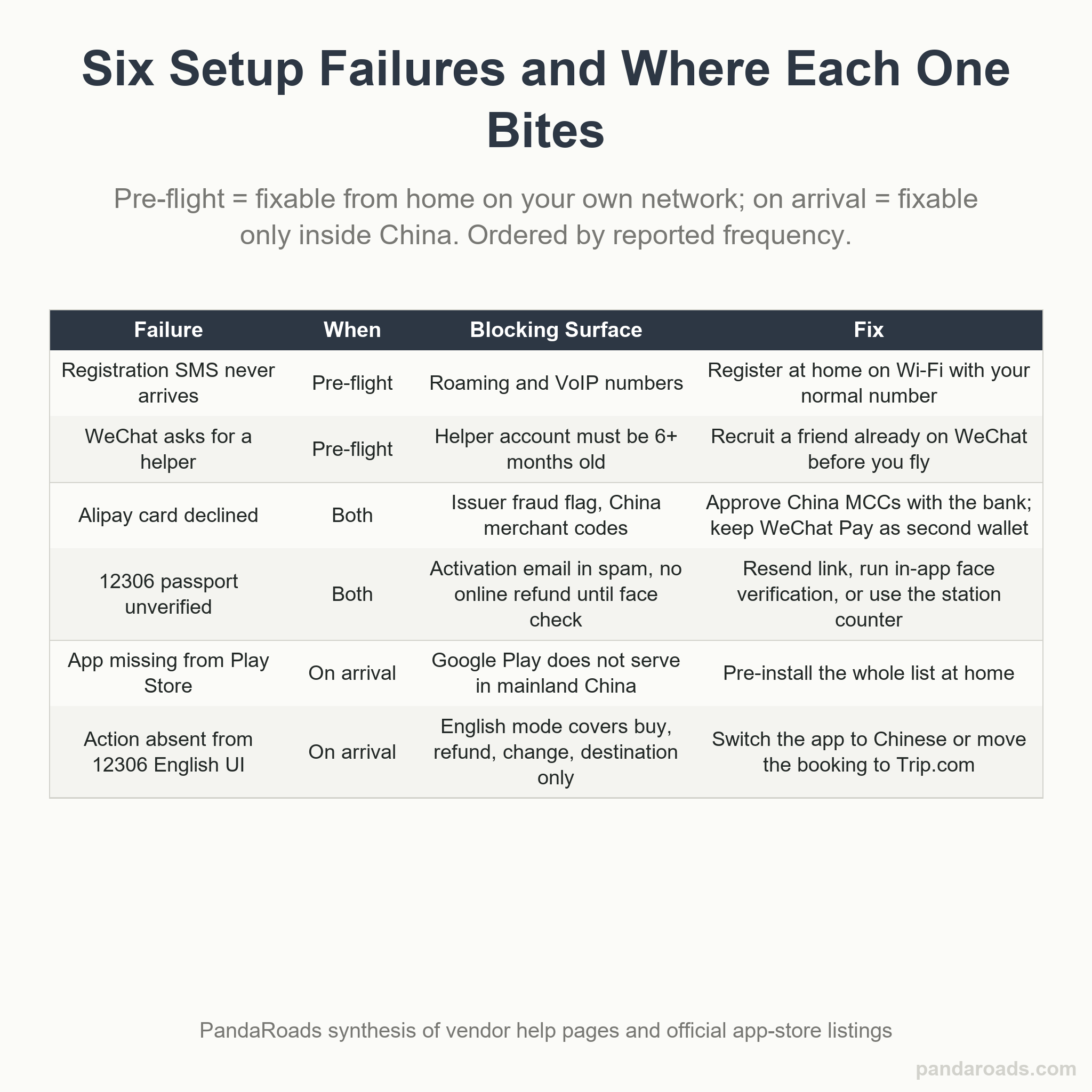
Symptom: the registration SMS never arrives. Cause: international SMS to some carriers and VoIP numbers is unreliable. Fix: request the code again on a short delay, try the voice-call option if the app offers one, and never start registration from roaming; do it on home Wi-Fi with your normal number, then it is already done before you travel.
Symptom: WeChat's security check demands a helper you do not have. Cause: assisted registration requires an existing account that is over six months old, active, and not recently blocked (source: cs.help.wechat.com). Fix: recruit a colleague, hotel contact or friend already on WeChat to complete Help Friend Register while you are both reachable; this is the gate people most often get stuck on once they land, and it cannot be cleared remotely, so do it before you fly.
Symptom: your linked Alipay card is declined at a small vendor. Cause: a per-transaction or issuer fraud flag, or a mismatch between the passport country in the app and the card's billing country. Fix: retry under the small-contactless threshold, fall back to your second wallet (WeChat Pay), and keep some cash (our China safety guide covers the everyday scams worth dodging); if declines repeat, call the issuer to approve China merchant category codes before departure.
Symptom: the 12306 activation email never shows, or your passport stays "to be verified". Cause: the activation link lands in spam, and window-bought tickets cannot be changed or refunded online until you finish facial verification in the app (source: 12306.cn). Fix: search spam for the sender, resend, and complete in-app face verification as soon as you have any data connection; failing that, the station's manual channel with your passport resolves it in person (source: trip.com).
Symptom: an app is simply missing from the Play Store when you search on arrival. Cause: Google Play does not serve normally in mainland China, so the store itself, not the app, is the blocker (source: jetpacglobal.com). Fix: this is why the whole list is pre-installed; if you are already stuck, a pre-downloaded Android APK from the official package name or the iOS App Store with a working home-region Apple ID are your routes back.
Symptom: a function you need is not in 12306's English screens. Cause: the English mode covers buying, changing, refunding and changing destination, but it is a subset of what the full Chinese client does (source: 12306.cn). Fix: switch the app language back to Chinese for the one missing action and drive it with camera translation, or move that booking to Trip.com's full-English flow and accept the small fee (source: trip.com).
The pattern behind all six: every one of them is trivial at home on your own network and painful on arrival, which is the entire argument for doing the sequence before you board.
Frequently Asked Questions
What apps do I need to download before going to China?
Five carry most of a first trip: Alipay and WeChat for payment and messaging, a maps app (AMap or Baidu Maps, because Google Maps does not load), DiDi for rides, and Railway 12306 for trains. Add Trip.com and Dianping once you want bookings and restaurant search. Download all of them before you fly, on your home network, while the stores still work (source: apps.apple.com), (source: jetpacglobal.com); our China travel tips for first-timers puts these apps inside a full first-trip checklist.
Does Google Play work in China?
No. Google Play, Gmail, Google Maps and the Google search app do not load on a mainland connection, so an app you did not install before you landed is effectively unavailable. iPhone users with a home-region Apple ID can still download from the App Store; Android users should pre-install everything or carry the APK from the official package name (source: jetpacglobal.com), (source: play.google.com).
Can foreigners use the 12306 app to buy train tickets?
Yes. China Railway's official app (铁路12306, Apple id 564818797) and its English website both sell tickets to foreign passengers using a valid passport, and the English site accepts foreign passports specifically (source: apps.apple.com), (source: 12306.cn). Register with an email rather than a Chinese number, activate by link, and expect partial English: purchase, refund, change and change-destination are covered, rarer actions are not.
Can I link a foreign credit card to Alipay?
Yes, and this is the current path. Alipay's own listing states that visitors from outside the Chinese mainland can connect an international credit card for use in China, and there is no local bank account or Chinese ID required to link one (source: apps.apple.com). The remaining friction is on the issuer side, so notify your bank and approve China merchant category codes before you leave.
Is Alipay Tour Pass still available?
No. Tour Pass, the 90-day prepaid pass tourists used to top up a virtual card, was discontinued in 2023 and replaced by direct linking of international Visa and Mastercard cards, with no deposit and no prepaid balance to manage (source: chinatravelpack.com). Any guide that walks you through buying a Tour Pass is at least three years out of date.
Do I need both WeChat and Alipay in China?
In practice, yes. Alipay is the stronger standalone wallet for a foreign visitor because it links an international card quickly, while WeChat Pay sits inside the app that hotels, drivers, landlords and offices actually use to communicate, so some people simply expect you on WeChat (source: apps.apple.com), (source: play.google.com). Install both, fund both, and whichever QR a vendor points at stops mattering.
Conclusion
The whole trick to China's app stack is that it is built at your kitchen table, not at the arrivals hall. Eight installs in a fixed order, payments first, cover money, messaging, rides, trains, maps, food and booking fallbacks. Do them while Google Play still loads, your own number still receives SMS, and a WeChat helper is one phone call away. Link the card, clear the passport checks, cache the offline maps, and the friction that breaks a first trip, the unverifiable wallet, the missing store, the helper you cannot reach from the terminal, simply never arrives. Do all of that and a self-guided trip stops being risky, which is the argument behind our DIY vs guided tour comparison.
References
- Alipay (Hangzhou) Technology Co., Ltd. (2026). Alipay - Simplify your life (Version 12.12.26) [Mobile application]. Apple App Store. https://apps.apple.com/us/app/alipay-simplify-your-life/id333206289
- Tencent Technology (Shenzhen) Company Limited. (2026). WeChat (Version 8.0.78) [Mobile application]. Apple App Store. https://apps.apple.com/us/app/wechat/id414478124
- Didi Chuxing (Beijing) Network Platform Technology Co., Ltd. (2026). DiDi China: Ride hailing (Version 8.0.13) [Mobile application]. Apple App Store. https://apps.apple.com/us/app/didi-china-ride-hailing/id554499054
- AutoNavi Information Technology Co. Ltd. (2026). AMap Global (Version 17.0.1) [Mobile application]. Apple App Store. https://apps.apple.com/us/app/amap-global/id461703208
- ACADEMY OF RAILWAY SCIENCES CO., ltd. (2026). 铁路12306 [Railway 12306] (Version 5.9.6) [Mobile application]. Apple App Store. https://apps.apple.com/us/app/%E9%93%81%E8%B7%AF12306/id564818797
- Hanhai Information Technology (Shanghai) Co.Ltd (2026). Dianping: Discover good places (Version 11.72.2) [Mobile application]. Apple App Store. https://apps.apple.com/us/app/dianping-discover-good-places/id351091731
- Trip.com Travel Singapore Pte. Ltd. (2026). Trip.com: Book flights, hotels (Version 8.57.2) [Mobile application]. Apple App Store. https://apps.apple.com/us/app/trip-com-book-flights-hotels/id681752345
- China Railway Customer Service Center. (2026). 12306 China Railway: Frequently asked questions. https://www.12306.cn/en/faq.html
- WeChat Help Center. (2026). How do I sign up for WeChat and assistance registration? Tencent. https://cs.help.wechat.com/hc/en-us/articles/11900776953999-How-do-I-sign-up-for-WeChat-and-assistance-registration
- Trip.com. (2026). How to book China high-speed train tickets on 12306. https://us.trip.com/guide/train/12306.html
Last reviewed and updated: September 2026. Author: our editorial team. For tailored guidance, contact our team.